

BA765 "Henry" Connection Tester
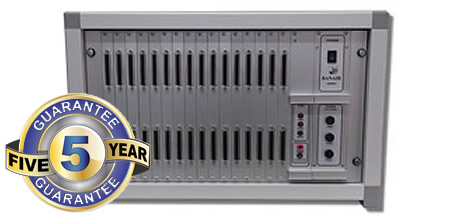
BA765 "Henry" Connection Test Systems
for Cables, Harnesses and Wiring Looms
This is a high specification tester that will measure many cable parameters. It measures cable resistance very accurately using the Kelvin 4-wire method. It also tests for shorts between pins at a low voltage. The next test is to measure insulation between connections at a higher voltage. This is carried out at up to 1500 Volts DC with resistances of 1 to 100 Meg ohms. There are many optional tests that can be carried out including HiPot tests and AC tests at up to 2000V. It is also possible to add and LCR tester and check that capacitors and resistors have been correctly fitted.
The modular design of this cable harness connection test system provides flexibility so that it will meet both your present requirements and it can expand for your future needs.
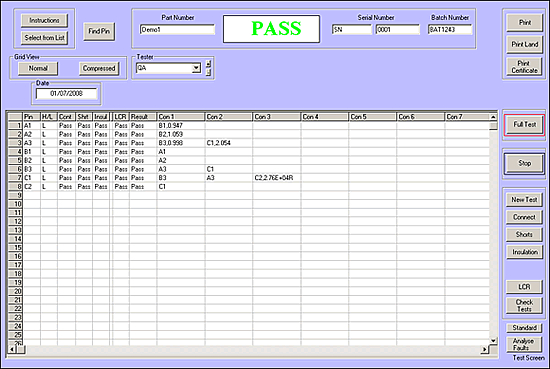
The Windows* software is user friendly, using the standard interface that you are familiar with. The cable harnesses and connection test results are displayed clearly on the screen, the table shows resistance values (Inductance and Capacitance value if this option is fitted), Pass or Fail results for shorts and continuity (Hipot DC / AC if option is fitted). This allows quick rework and feedback to production of the nature and position of the faults.
All the results are stored in a standard Access database format allowing production and quality control to record test results and to analyse them for AQL.
- Measures resistance, checks continuity and Shorts.
- 4 wire testing for accuracy. Measure resistance with a resolution of 1 milli Ohm.
- Test insulation to 1000V /1500V /2500V DC (model dependent.)
- Optimised for testing of cables, flexible circuits, connectors and wiring harnesses.
- All results saved in Access Database.
- Printed results sheets and labels.
- User friendly Windows* software.
- Cost effective modular design.
- Improved quality control resulting in time and cost savings.
- "Identify a wire" used to locate pins, save time during assembly.
- Faults identified for rework.
- “Hands free” testing using a footswitch.
- Maximum number of cables stored is only limited by the size of your computer hard disk.
- AC Flash test (Option)
- Measure Capacitance (Option)
- Measure Inductance (Option)
BA765 - DEMI
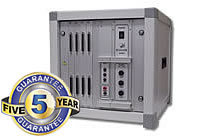 The BA765-Demi cable and wiring harness tester is a compact version of its big brother, designed for when you require the test ability and specification of the BA765 but you do not require the full expandability of the larger system. This system operates exactly the same as the BA765 and is expandable up to 160 test points.
BA765 - Demi connection tester for Cables, Harnesses and wiring Looms. This is a more portable version of the standard BA765 cable tester, ideal if you require the high testing specification but do not require many test points.
Features
 |
USB: USB connections for fast and easy setup - no internal PC cards required. Windows 7,Windows 8, Windows 10 or Windows 11. |
|
Connections: Each module has 16 connections (32 test points) - Min 32 test points / Max 512 test points per standard 19" enclosure. Test units can be added in blocks of up to 512 test points per 19" unit. |
Continuity Test |
|
|
Voltage: 5V dc @ <500mA |
|
Resistance: 0.002 to 1k Ohms user definable, 4-wire (Kelvin) - See Options. |
|
Accuracy: 1% +/- 0.002 Ohms. |
|
Test time: Resistance; 256 connections per 2 second. Short circuits; 1 to 20 seconds dependent on configuration. |
Dielectric Test: (BA765-10) |
|
|
Voltage: 50V to 1000V dc +/- 5% |
|
Current: Limited to 1mA. |
| Dielectric Test: (BA765-15) | |
|
Voltage: 50V to 1500V dc +/- 5% |
|
Current: Limited to 1mA. |
| Dielectric Test: (BA765-25) | |
|
Voltage: 50V to 2500V dc +/- 5% |
|
Current: Limited to 1mA. |
| Test Options | |
|
Voltage: AC |
|
Capacitance: Up to 2000uF |
|
Inductance: Up to 1000H |
|
Resistance: Up to 20Mohms |
|
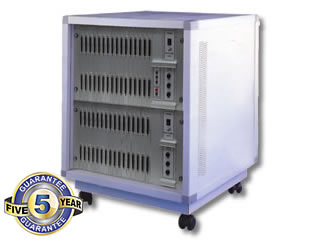
Enclosure: The system, dependent on requirements can be supplied in either 6U 19" cabinet / case / rack mounting or half size system. |
 |
BA765-INT-HV4 2 & 4-Wire Easy Connect Adaptor Board |
Click for a Free Quotation
Part No |
Description |
BA765 |
Standard Connection Test System (5-Year GT) |
BA765-Demi |
Standard Connection Test System - Half size (5-Year GT) |
BA765-10 |
High Voltage Connection Test System - 1000VDC (5-Year GT) |
BA765-15 |
High Voltage Connection Test System - 1500VDC (5-Year GT) |
BA765-25 |
High Voltage Connection Test System - 2500VDC (5-Year GT) |
BA765-32MOD |
32 connection module (5-Year GT) |
BA765-INT-HV2 |
Interface adaptor board fitted with screwless terminal blocks - 2 Wire |
BA765-INT-HV4 |
Interface adaptor board fitted with screwless terminal blocks - 4 Wire |
BA765-INT-CAB-1 |
Interface cable assembly 37-37 D-Type 1M |
BA765-CA1/CA2 |
Set of calibration modules (uncalibrated) |
BA765-CA1/CA2 CAL |
Calibration of 1 set of modules (BA765-CA1 & BA765-CA2) |
 |
5-Year GT Product marked (5-Year GT) have a 5 Year Banair Guarantee. Click here for more details. |
